

Description
BravesChat is the bridge between your WordPress site and your N8N workflows: connect any AI agent you have built with your visitors, without extra code and in minutes.
Designed for the N8N community
- N8N-ready webhook: Point BravesChat to your workflow URL and start receiving messages instantly. Supports an authentication token in the header (
X-N8N-Auth) to protect your endpoints. - Complete payload on every message: Each request includes the current message and the user’s unique
sessionId— everything your N8N nodes need to maintain conversation context. - Markdown responses: Your agent’s messages are rendered with rich formatting — bold, lists, links, and code — with no extra configuration.
- Conversation history with CSV export: Browse all sessions from the WordPress dashboard and export them to your CRM, spreadsheet, or database with one click.
Production-ready
- Three display modes: Floating widget, full screen, or mixed — global bubble with full screen on specific pages via a Gutenberg block.
- Dark mode admin panel: Toggle between light and dark theme. Preference is saved per user and restored without flash.
- Configurable business hours: Define when the chat is active and show a custom message outside those hours — ideal if your agent depends on a human in the loop.
- Built-in GDPR compliance: Consent banner that blocks the chat until the user accepts. Montserrat font loaded locally, no external requests.
- Full brand customization: Colors, texts, position, skin, and display mode — all adjustable without touching code.
- Reinforced security: The N8N authentication token travels only on the server — it is never exposed in the page HTML.
- WooCommerce compatible: Works in WooCommerce stores without conflicts, enabling conversational assistance throughout the purchase process.
Session identification with Fingerprinting
BravesChat generates a unique sessionId per visitor based on browser characteristics (SHA-256 hash), without storing personal data. This allows N8N to maintain conversation context even if the user reloads the page.
External services
N8N Webhook (user-configured)
This plugin sends chat messages to an N8N webhook URL configured by the site administrator.
What data is sent: The visitor’s chat message, conversation history, an anonymous session identifier (fingerprint), and the current page URL.
When: On every message sent by a visitor through the chat widget, but only if the administrator has configured a webhook URL.
Why: To forward the conversation to the administrator’s N8N workflow for AI processing.
The webhook URL, destination server, and all data processing are fully controlled by the site administrator. No data is sent to any Braves-operated server.
Screenshots
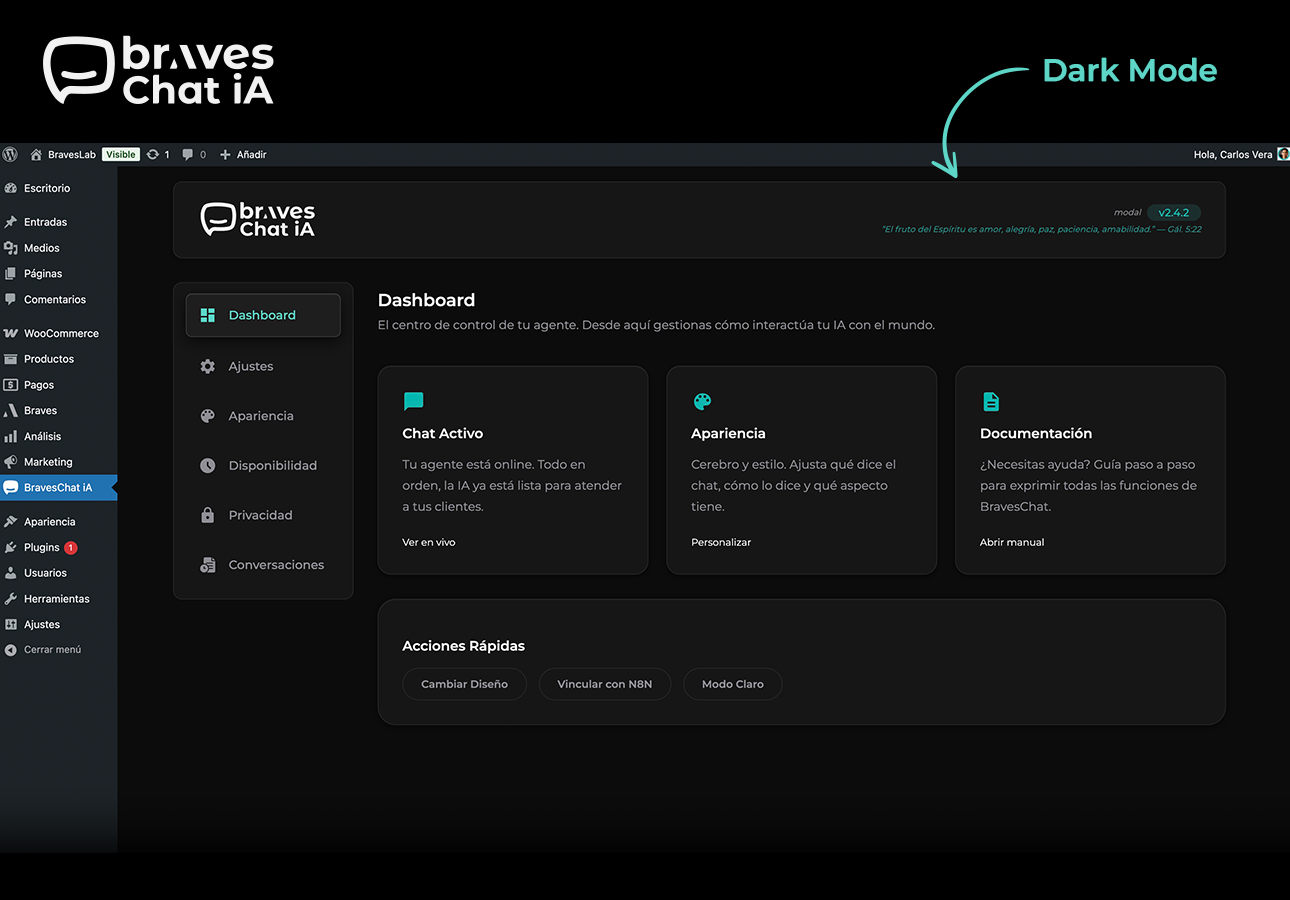
Admin panel dark mode — full dark theme with the new toggle. 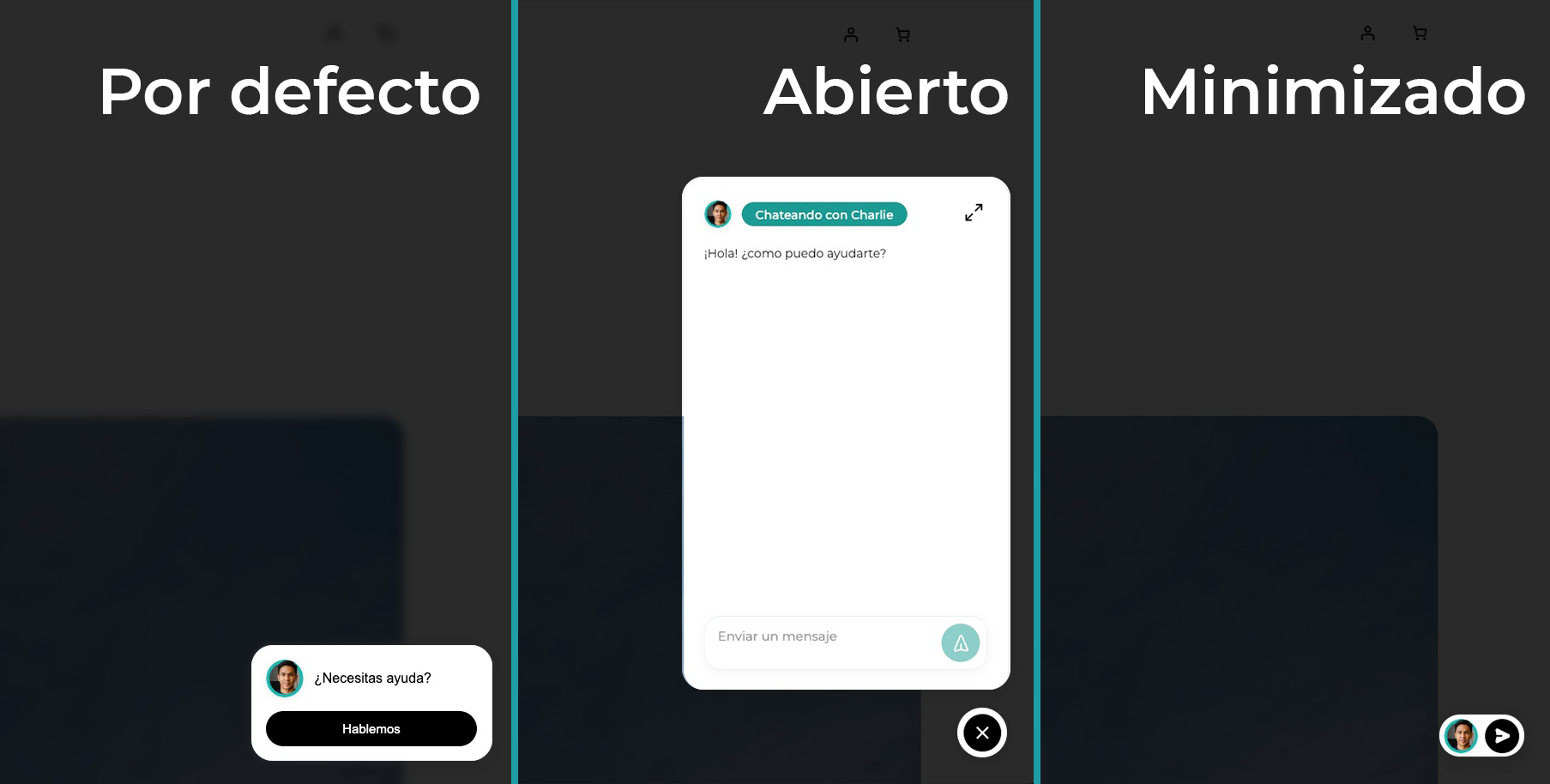
Floating widget on the frontend — Braves skin showing different display behaviors. 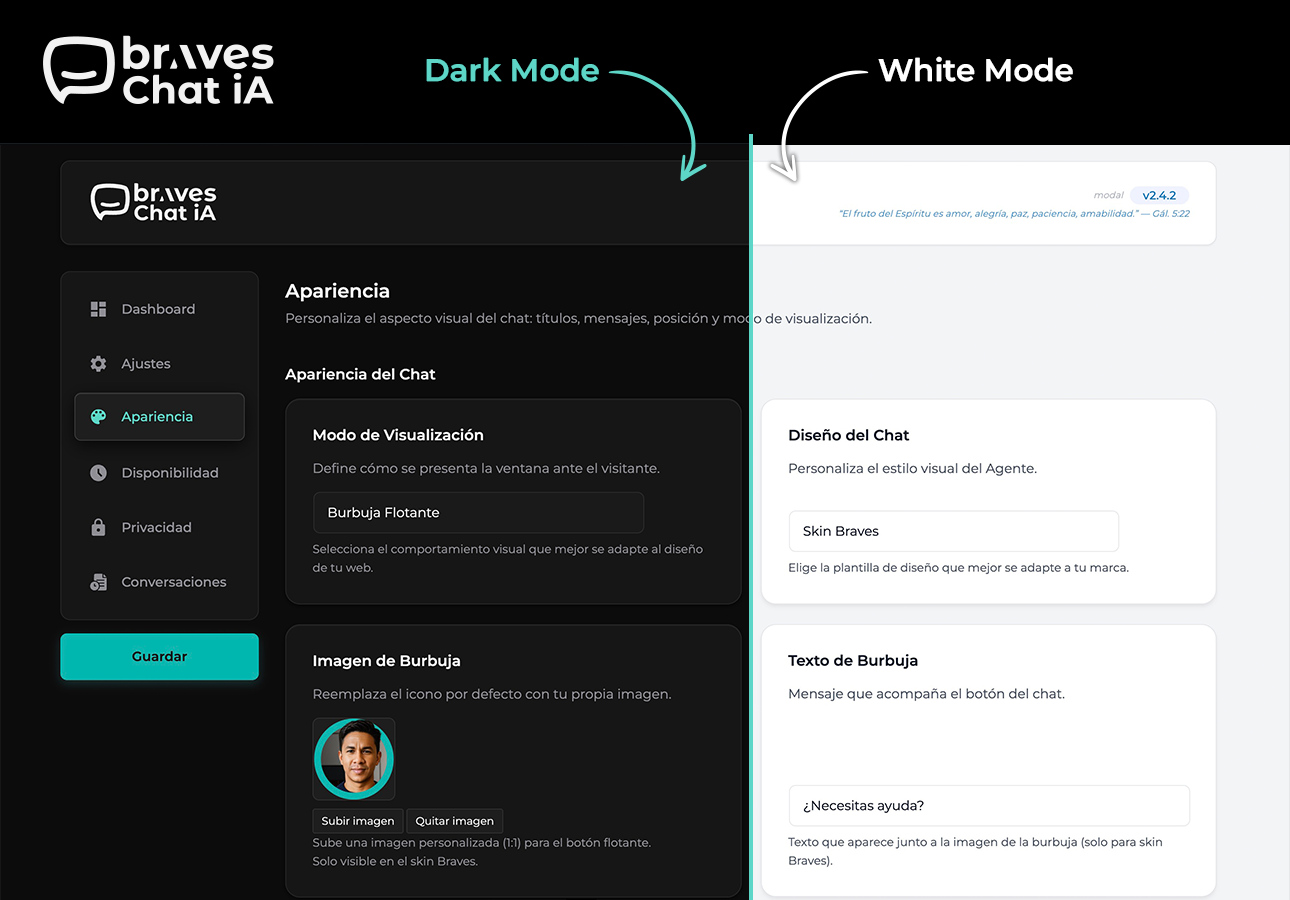
Appearance — color, position, skin, bubble image, and display mode customization. 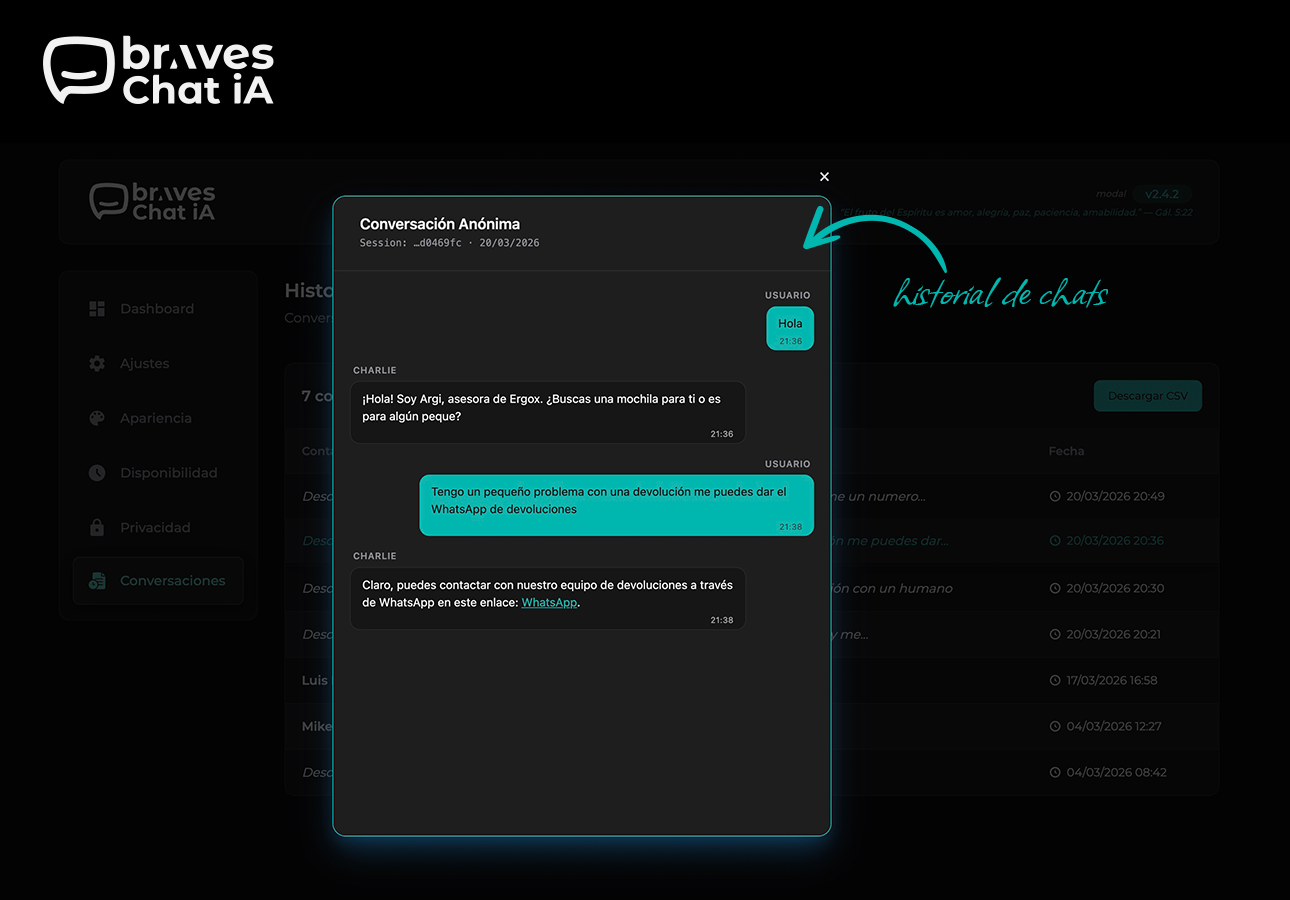
Conversation history — per-session viewer with chat bubbles and CSV export. 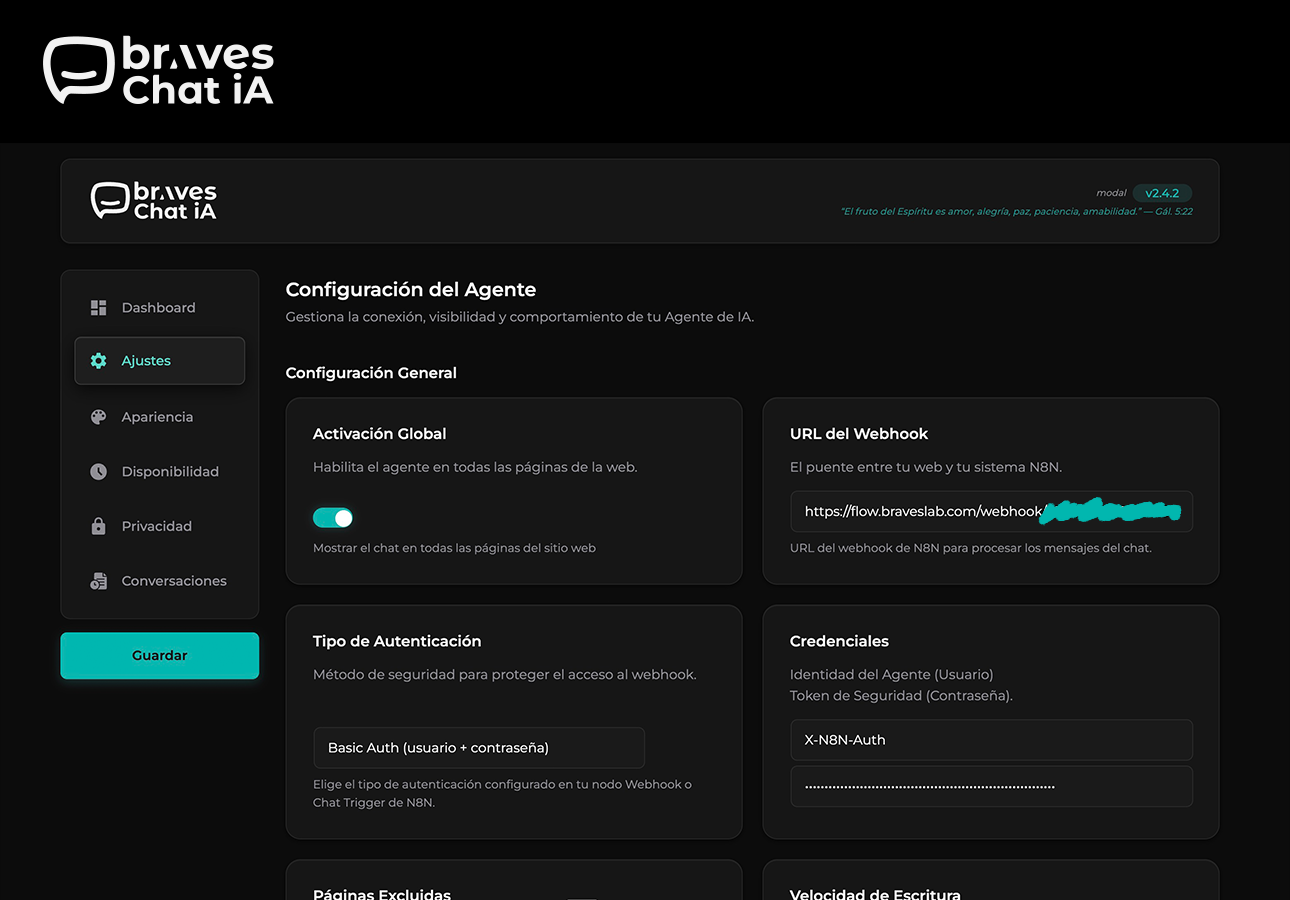
Settings — N8N webhook configuration, authentication method, and chat behavior.
Blocks
This plugin provides 1 block.
- BravesChat — Full Screen
Installation
- Upload the
braveschatfolder to the/wp-content/plugins/directory. - Activate the plugin from the Plugins menu in WordPress.
- Go to BravesChat Settings and enter your N8N webhook URL.
- (Optional) Customize colors, texts, and position under Appearance.
- (Optional) Configure the consent banner under GDPR.
FAQ
-
Do I need an N8N account to use BravesChat?
-
Yes. BravesChat acts as the chat widget on your WordPress, but the intelligence and responses are managed by your own N8N workflow. You can use N8N Cloud or your self-hosted instance.
-
Does it work with any AI agent in N8N?
-
Yes. BravesChat sends the message and the conversation
sessionIdto the webhook URL you configure. The agent can be connected to OpenAI, Claude, Gemini, Ollama, or any model your workflow supports — BravesChat imposes no restrictions. -
What data is sent to the webhook on each message?
-
Each request includes: the user’s message (
chatInput) and the unique session identifier (sessionId). Conversation history is managed by N8N via thesessionId. -
Is the conversation history saved in the WordPress database?
-
No. The history shown in the admin panel is fetched directly from your N8N data source (e.g., PostgreSQL) via a separate webhook that you configure.
-
Can I hide the chat on certain pages?
-
Yes. In the Settings section you can specify pages where the widget should not appear.
-
Is it compatible with WooCommerce?
-
Yes, BravesChat is compatible with WooCommerce and does not generate conflicts with the checkout process or store styles.
-
Does the plugin comply with GDPR?
-
Yes. You can enable a consent banner that blocks the chat until the user accepts. User fingerprinting does not collect personal data. The Montserrat font is loaded locally, with no requests to Google Fonts.
-
Can I use BravesChat without N8N?
-
Technically yes: the webhook can point to any HTTP endpoint that returns JSON with the
outputfield. However, the plugin is optimized and documented for N8N workflows. -
Is the N8N authentication token secure?
-
Yes. The token travels only on the server — it is never exposed in the page HTML or JavaScript. The frontend sends messages to the WordPress AJAX endpoint, which acts as a proxy and adds the token before contacting N8N.
Reviews
There are no reviews for this plugin.
Contributors & Developers
“BravesChat” is open source software. The following people have contributed to this plugin.
Contributors
“BravesChat” has been translated into 1 locale. Thank you to the translators for their contributions.
Translate “BravesChat” into your language.
Interested in development?
Browse the code, check out the SVN repository, or subscribe to the development log by RSS.
Change log
2.4.6
- FIXED: Chat links from AI responses with non-HTTP protocols (e.g. javascript:) are no longer rendered — only https:// and http:// are accepted. Prevents potential XSS from malicious agent responses.
- FIXED: Auth header name sanitized before use to prevent header injection.
- FIXED: History modal no longer shows hardcoded Spanish labels (“Conversación Anónima”, “Session:”, “Usuario”) — all strings are now translatable.
- ADDED: Bible verses in the admin header now appear in English when WordPress is not set to Spanish.
- IMPROVED: Changelog timeline in the About page no longer requires manual spacing values — adding a new entry is as simple as setting braves-tl-right or braves-tl-left.
2.4.5
- FIXED: Bible API dependency removed — verses now served from a local file with 365 NVI verses. No external requests.
- ADDED: Full English translation of the admin UI with i18n support for es_ES.
- ADDED: About page translated to English; Spanish translations preserved in the .po file.
- FIXED: N8N auth token no longer exposed via console.log in the browser.
- FIXED: HTTP/HTTPS scheme validation added before wp_remote_get() calls.
- FIXED: $_GET[‘page’] sanitized and boolean values properly escaped in hidden inputs.
- FIXED: i18n pattern in admin.js updated to use const { __ } = wp.i18n — compatible with wp i18n make-json.
2.4.4
- IMPROVED: All user-visible strings in the admin panel JavaScript are now fully translatable via WordPress i18n (wp.i18n.__).
- IMPROVED: Admin script registered with translation support — JSON language files loaded automatically for the active locale.
- FIXED: Hardcoded default text for bubble, screen footer, and settings fields is now translatable — no more untranslated strings in non-English installs.
2.4.3
- ADDED: Mixed display mode — floating bubble on all pages, fullscreen chat on pages with the Gutenberg block.
- IMPROVED: Chat widget now forces light color scheme, preventing iOS Safari dark mode from inverting widget colors.
- IMPROVED: GDPR banner colors are now fully isolated from theme dark mode — text colors stay consistent on all themes.
- FIXED: Fullscreen block mode now renders a background overlay that hides the white page background while the chat loads.
- FIXED: Chat input placeholder color no longer inherits from the active theme.
- FIXED: Screen CSS is now always loaded on pages using the fullscreen Gutenberg block, regardless of global display mode setting.
2.4.2
- ADDED: Dark mode for the admin panel — toggle between light and dark theme. Preference is saved per user and restored on every page load without flash.
- IMPROVED: Admin UI uses semantic CSS variables throughout — dark mode adapts automatically with no hardcoded colors.
- IMPROVED: Select/deselect all pages buttons in Settings are now styled consistently with the rest of the admin panel.
- IMPROVED: Inline styles removed from field help text and range labels — styles now come from CSS classes for better dark mode support.
- IMPROVED: Message preview no longer injects hardcoded inline styles — uses CSS class instead.
2.4.0
- ADDED: Mobile fullscreen mode — on devices up to 480px the chat opens as a full-screen overlay with its own header, back/close buttons, and iOS safe-area support.
- IMPROVED: WooCommerce compatibility — z-index adjusted so WooCommerce cart and checkout elements always render on top of the chat widget.
- IMPROVED: Logo now rendered as a standard img tag instead of inline SVG — compatible with strict Content Security Policy configurations.
- IMPROVED: Admin scripts moved from PHP templates to wp_add_inline_script — resolves Plugin Check (PCP) warnings about inline scripts in templates.
- IMPROVED: Menu icon SVG sanitized before encoding as data URI to prevent rendering issues in some browsers.
- IMPROVED: Style version added to wp_register_style for reliable cache busting on plugin updates.
- FIXED: Daily verse selection now uses gmdate instead of date for correct UTC-based rotation.
- FIXED: External service disclosure added to API.Bible integration for WordPress.org compliance.
2.3.8
- ADDED: A Bible verse (NIV) appears in the header of the panel every day. It updates automatically—no setup required.
2.3.7
- ADDED: Agent Name field in Appearance — label your agent to identify conversations in History.
- IMPROVED: Status notices (configuration warnings, save confirmations) moved to the header bar — cleaner page layout across all admin sections.
- IMPROVED: Sidebar navigation labels updated — “Schedules” “Availability”, “GDPR” “Privacy”, “History” “Conversations”.
- IMPROVED: Version badge in the header highlights when you are on the About page.
- IMPROVED: Display mode and skin option labels rewritten for clarity.
- IMPROVED: Changelog in the About page redesigned as a two-column timeline layout.
2.3.5
- FIXED: Image upload button in Appearance now correctly opens the WordPress Media Library.
2.3.4
- IMPROVED: Chat bubble is now smaller on mobile devices — default skin shrinks to 48×48px, Braves skin switches to a compact avatar + button layout.
2.3.3
- FIXED: Text domain updated to
braveschatacross all files to match the WordPress.org assigned slug. Resolves all Plugin Check (PCP) text domain errors.
2.3.2
- FIXED: Plugin Check text domain mismatch — the distributed ZIP now uses the correct plugin slug (
braves-chat) so the text domain validates correctly on WordPress.org.
2.3.1
- IMPROVED: Input field stays active while the bot is responding — users can type and interrupt at any time.
2.3.0
- ADDED: N8N authentication token now travels server-side only — never exposed in the browser.
- ADDED: Three authentication methods for N8N: custom header, Basic Auth, or none.
- IMPROVED: Simplified frontend JavaScript by removing streaming/NDJSON logic — all N8N connection complexity is now handled server-side.
- IMPROVED: Plugin images converted to PNG for better browser and WordPress.org compatibility.
- IMPROVED: License updated to GPL-2.0-or-later, aligned with WordPress.org requirements.
- FIXED: Removed ZIP export detection class that caused false positives.
2.2.3
- ADDED: “View details” link in the plugins list with full plugin information.
- IMPROVED: Rich text editor for GDPR messages and out-of-hours messages.
2.2.2
- ADDED: Protection class detects ZIP export plugins installed on the site and shows a security notice in the admin panel.
2.2.1
- FIXED: Notices from other plugins no longer appear inside the BravesChat panel.
2.2.0
- ADDED: Full conversation history viewer with per-session modal.
- ADDED: History export to CSV with all relevant fields.
- IMPROVED: Conversations ordered from most recent to oldest.
2.1.5
- ADDED: History page replaces Statistics — open any session and read the full conversation thread with chat bubbles, timestamps, and sender labels.
- ADDED: CSV export with all fields: session ID, client name, updated at, full chat history JSON.
- IMPROVED: Messages displayed in chronological order inside the session modal.
- FIXED: Internal N8N tool calls and JSON responses filtered from the conversation viewer.
2.1.4
- ADDED: Statistics tab with live conversation history fetched from your N8N/Postgres webhook.
- ADDED: CSV export with all fields: session_id, client_mail, last_message, updated_at, chat_history, metadata.
2.1.3
- FIXED: GitHub Actions release workflow now correctly triggers on v* tags — automated ZIP generation working.
2.1.2
- IMPROVED: CSS isolation system to prevent conflicts with themes.
2.1.1
- IMPROVED: Incremental real-time Markdown rendering.
2.1.0
- ADDED: Configurable typing speed slider.
- ADDED: HTML/Markdown support in the GDPR banner message.
- ADDED: Montserrat loaded locally (GDPR compliance).
2.0.0
- MAJOR: Complete system restructuring with new BravesChat namespace.
- ADDED: Maximize button, textarea auto-growth, minimized state.
1.2.4
- ADDED: Bubble tooltip customizable from the Appearance panel.
- ADDED: Automatic detection and deactivation of older plugin versions on activation.
- IMPROVED: Default icon color updated to #f2f2f2.
1.2.3
- ADDED: Full color customization — bubble, primary, background, and text colors with native color pickers.
- ADDED: SVG icon selector with four styles (original, circle, happy, bubble).
- FIXED: Removed Lottie Player CDN dependency — replaced with static SVG.
1.2.2
- FIXED: Critical — form inputs not rendering on Settings, Appearance, Schedules, and GDPR pages.
- FIXED: Settings from other tabs were lost when saving a partial form.
- IMPROVED: Admin notifications auto-hide after 3 seconds with slide animation.
1.2.1
- IMPROVED: Complete admin panel redesign with Bentō card layout.
- ADDED: Shared sidebar navigation across all admin sections.
- ADDED: Reusable component architecture — Header, Sidebar, Content.
1.2.0
- ADDED: New administration system with modern dashboard and Bentō design.
1.1.2
- CHANGED: Rebranding from Weblandia to BravesLab — updated URLs, author, and copyright.
1.1.1
- ADDED: Cookie system with fingerprinting for session identification.
1.1.0
- ADDED: Availability schedules with timezone support and custom offline message.
- ADDED: Excluded pages — configure which pages should not show the chat widget.
- ADDED: N8N authentication token support via X-N8N-Auth header.
1.0.0
- Initial plugin release.