

Description
XtremeSlider is a free, lightweight WordPress slider plugin that lets you create stunning image sliders with four distinct layout modes and embed them anywhere using a simple shortcode.
Built for performance — the frontend uses pure vanilla JavaScript with zero external dependencies.
Four Layout Modes
Default — Editorial full-bleed slider with peek effect. Center slides are fully visible while adjacent slides peek from the edges. Features infinite seamless looping, vertical title text overlay, and caption/description sections below center slides.
Cool — Card-based slider with customizable gradient background. Rounded-corner slides with hover lift effects and pagination dots.
3D — Dramatic CSS perspective slider with depth transforms. Center slide is prominent while adjacent slides rotate and scale back in 3D space with glassmorphism-styled arrows. Per-slider background color.
Options — Static grid of clickable option cards (image + title + caption). Clicking a card reveals its own HTML content in a detail panel below — useful for product variants, plan comparisons, or “pick one, see details” interfaces. Each card’s HTML is editable with inline Code / Preview tabs. Per-slider background color.
Key Features
- Infinite Loop — Default layout uses clone-based seamless cycling that never ends
- Up to 10 Slides — Add up to 10 images per slider with drag-to-reorder
- 4 Content Fields Per Slide — Title (vertical overlay), Caption (heading below), Description (paragraph below), Link URL
- Relative & Absolute Links — Link to
/roofingorhttps://example.com - Image Ratios — Choose 16:10 (landscape), 1:1 (square), or Fixed Height (pixel height, width scales to natural proportions) per slider. Premium adds Default (original) ratio
- Autoplay — Configurable speed (2-10 seconds), pauses on hover
- Fullscreen Mode — 100vw edge-to-edge display
- Touch & Swipe — Full mobile touch support
- Responsive — 4 breakpoints (desktop, tablet, mobile, small mobile)
- Hover Effects — Image zoom on hover, caption underline color change
- Link Hover Color — Configurable per slider via color picker
- Gradient Background — Two-color gradient picker for Cool layout
- Background Color — Solid color picker for 3D and Options layouts
- Display Toggles — Square corners and black arrows toggles per slider
- Shortcode Overrides — Override layout, visible count, autoplay, fullscreen per instance
- Conditional Loading — CSS/JS only load on pages containing a slider
No Dependencies
Fully standalone. No WooCommerce, Elementor, or any other plugin required.
Elementor & Gutenberg Compatible
Works in Elementor Shortcode widget, Gutenberg Shortcode block, Classic Editor, or any page builder.
Support
Please submit bugs, patches, and feature requests to:
Screenshots
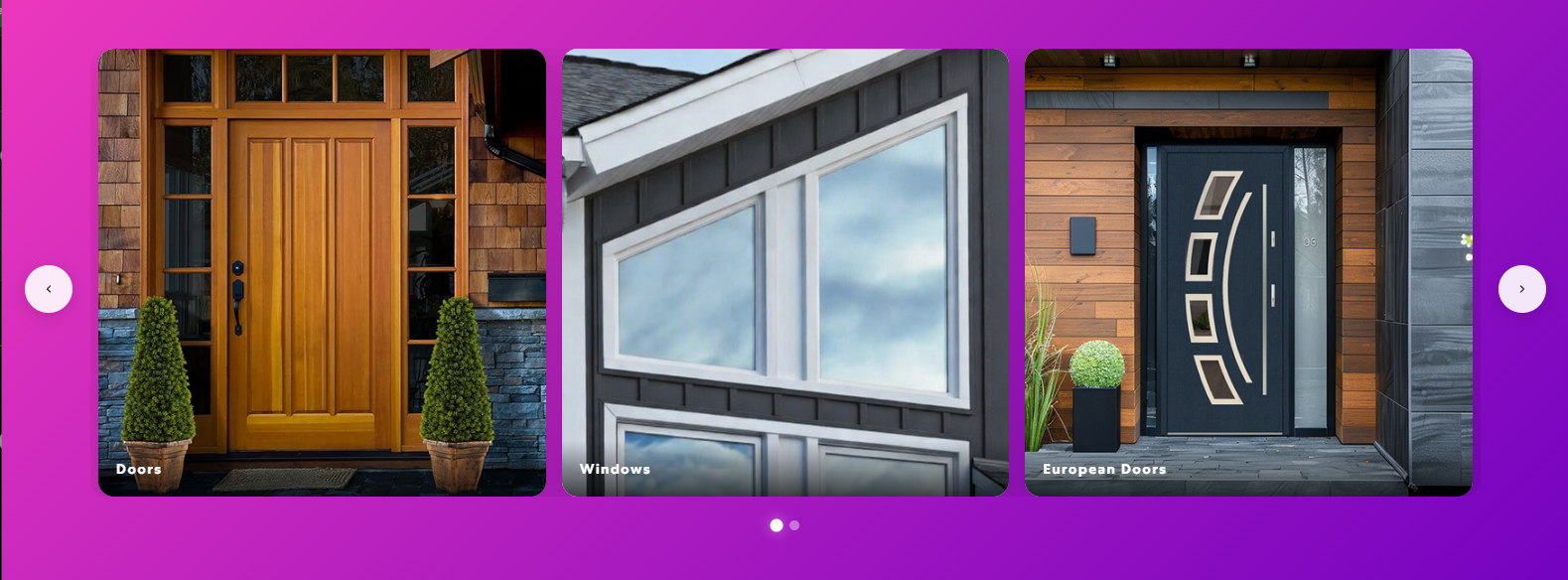
Cool layout — card-based slider with gradient background and pagination dots 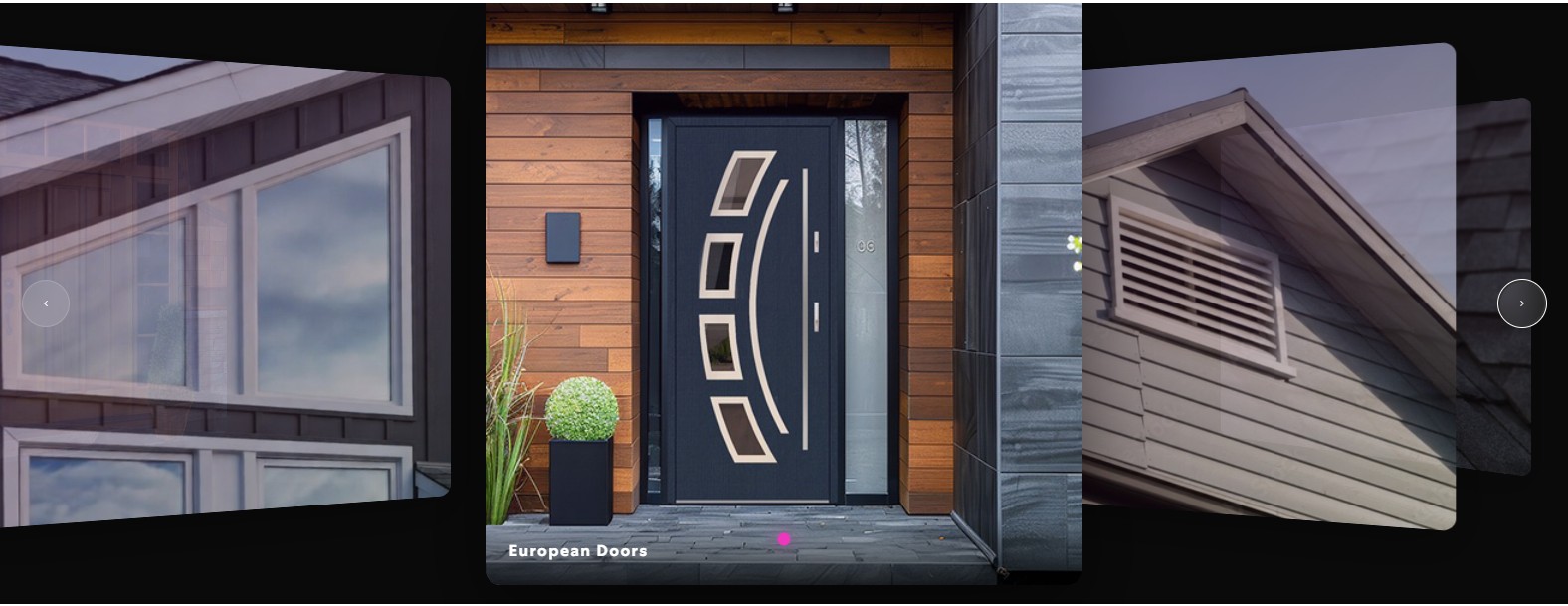
3D layout — perspective depth slider with center slide prominent and adjacent slides rotated 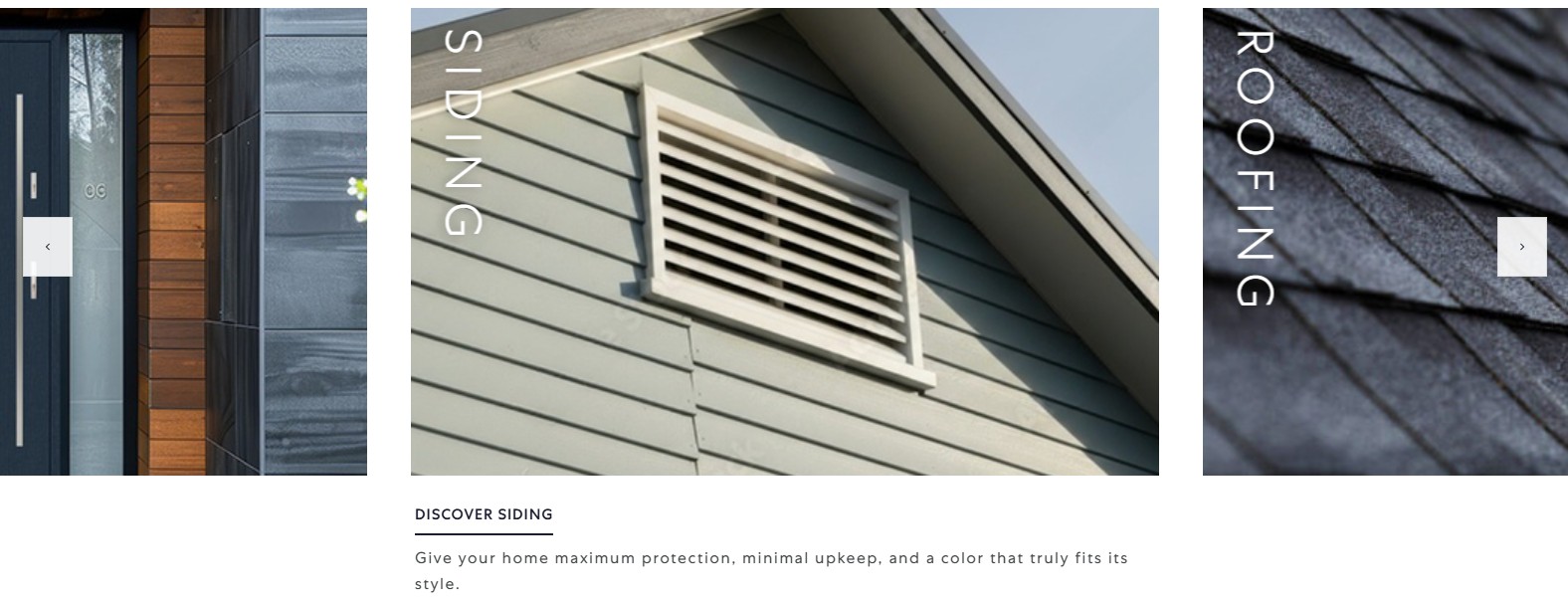
Default layout — editorial full-bleed slider with vertical title overlay, peek effect, and caption below 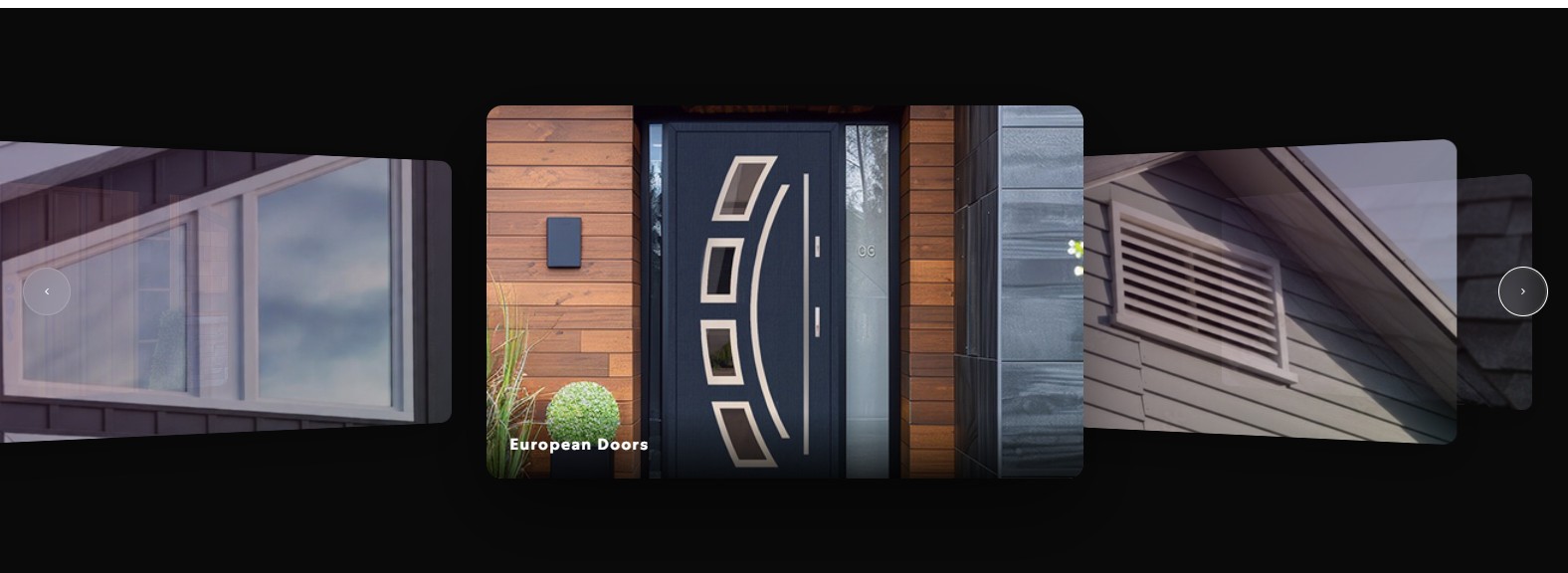
3D layout — wide view showing five visible slides with depth transforms and glassmorphism arrows
Installation
- Download
xtreme-slider.zip - Unzip
- Upload the
xtreme-sliderdirectory to/wp-content/plugins - Activate the plugin
- Create your first slider from the Xtreme Slider menu
- Copy the shortcode and paste it into any page
FAQ
-
Does this work without WooCommerce?
-
Yes. Fully standalone with zero external dependencies.
-
Does it work with Elementor?
-
Yes. Paste
[xtreme_slider id="X"]into Elementor’s Shortcode widget. -
How many sliders and slides can I add?
-
Free mode allows up to 2 sliders, up to 10 images per slider, and 1-6 visible slides at once.
Premium unlocks unlimited sliders, up to 50 images per slider, and up to 15 visible slides at once. -
Is the slider responsive?
-
Yes. Adapts across 4 breakpoints with touch/swipe on mobile.
-
Does it slow down my site?
-
No. Vanilla JavaScript (~5KB), no jQuery. Assets only load on pages with a slider.
-
Can I use relative URLs?
-
Yes. Paths like
/roofingwork. Internal links stay in same tab, external links open in new tab. -
Can I override settings per shortcode?
-
Yes.
[xtreme_slider id="5" layout="3d" visible="2" autoplay="true" fullscreen="true"]
Reviews

Contributors & Developers
“Xtreme Slider (3D Image Slider)” is open source software. The following people have contributed to this plugin.
Contributors
Translate “Xtreme Slider (3D Image Slider)” into your language.
Interested in development?
Browse the code, check out the SVN repository, or subscribe to the development log by RSS.
Change log
1.4.4 – 13th May 2026
- WordPress.org Plugin Check compliance pass — added translators: comments for placeholder strings, tightened input sanitization on the slider editor, gated error_log() output behind WP_DEBUG so production logs stay clean
- Description text refreshed to cover the Options layout (added in 1.4.1) — no behavioural change
1.4.3 – 9th May 2026
- Fixed Cool layout fixed-height sliders losing navigation arrows when more than one slider was on the page — slide widths are derived from natural image dimensions, but lazy-loaded images had not finished loading at init time, so the max-page calculation read width 0 and hid the arrows. Layout and arrow visibility now re-run as each slide image loads, plus once on
window.load
1.4.2 – 9th May 2026
- Fixed Cool layout with fixed-height image ratio cropping wider images by forcing all slides to a uniform slot width — slides now keep each image’s natural width derived from its aspect ratio at the configured fixed height
- Cool layout navigation in fixed-height mode now scrolls by per-slide width instead of a uniform page step
1.4.1 – 20th April 2026
- Added
Optionslayout — clickable static cards that reveal per-slide HTML content in a detail panel below - Added inline Code / Preview tabs for editing the HTML content of each option
- Added
Background Colorpicker for the Options layout - Added
Background Colorpicker for the 3D layout - Improved 3D layout to respect the configured visible slide count
- Improved 3D layout with fixed-height image ratio to preserve natural aspect ratio
- Preselect first card in the Options layout on load
1.3.4 – 11th April 2026
- Added
Black arrowsdisplay option for solid black arrow circles with white icons - Added live upgrade support for the new
black_arrowsslider setting column
1.3.3 – 11th April 2026
- Limited free mode to 2 total sliders
- Disabled new slider creation in the admin once the free slider cap is reached
- Blocked direct/cached create requests in the save handler so the free slider limit cannot be bypassed
1.3.2 – 11th April 2026
- Added premium license activation with up to 50 images per slider and up to 15 visible slides
- Added premium-only
Default (Original ratio)image ratio option - Added
Load Titlesaction to fill slide titles from image filenames - Added
Square cornersdisplay option for sharp image corners - Improved editor save feedback with a compact inline status pill
- Fixed save failures on installs missing newer slider-table columns
- Fixed partial save/orphan slide rows by making slider saves transactional
1.2.0 – 25th March 2026
- Added image ratio option: 16:10 (landscape) or 1:1 (square) per slider
- Added link hover color picker — configurable per slider
- Added shortcode attribute overrides: layout, visible, autoplay, fullscreen
- Added mouse drag support for Default layout
- Improved responsive breakpoints across 4 screen sizes
- Refined 3D layout depth and rotation values
- Fixed infinite loop flickering on fast consecutive clicks
- Fixed 3D layout not recalculating on resize
- Fixed autoplay timer not resetting after manual navigation
1.1.0 – 14th February 2026
- Added Cool layout — card-based slider with gradient background
- Added pagination dots for Cool and 3D layouts
- Added fullscreen mode (100vw edge-to-edge)
- Added gradient background picker with live preview
- Added touch/swipe support for all layouts
- Added autoplay with configurable speed and hover pause
- Admin design overhaul — neumorphic design system
- Drag-to-reorder slides with sortable cards
- Visual radio cards for layout selection
- Fixed shortcode rendering empty div with no slides
- Fixed color picker popup overlap on small screens
- Fixed status toggle save issue
1.0.0 – 8th January 2026
- Initial production release
- Default layout — editorial full-bleed slider with peek effect and infinite loop
- 3D layout — perspective slider with depth transforms and glassmorphism arrows
- Free mode: up to 2 sliders, 10 images per slider, and 1-6 visible slides
- Premium mode: unlimited sliders, 50 images per slider, and up to 15 visible slides
- Per-slide fields: title, caption, description, link URL
- Relative and absolute link support
- Image hover zoom effect
- Conditional CSS/JS loading
- Admin panel with slider list, edit screen, and settings
- Copy-to-clipboard shortcode button
- Clean uninstall — drops tables and options